What’s New in Dashboard Legal
Stay up to date on the latest workflow tools, feature releases, and enhancements designed to make your legal work more efficient.
Already have an account? Login
Recent product updates
August 2026
AI Assistant (Dash)
Turn matter content into answers.
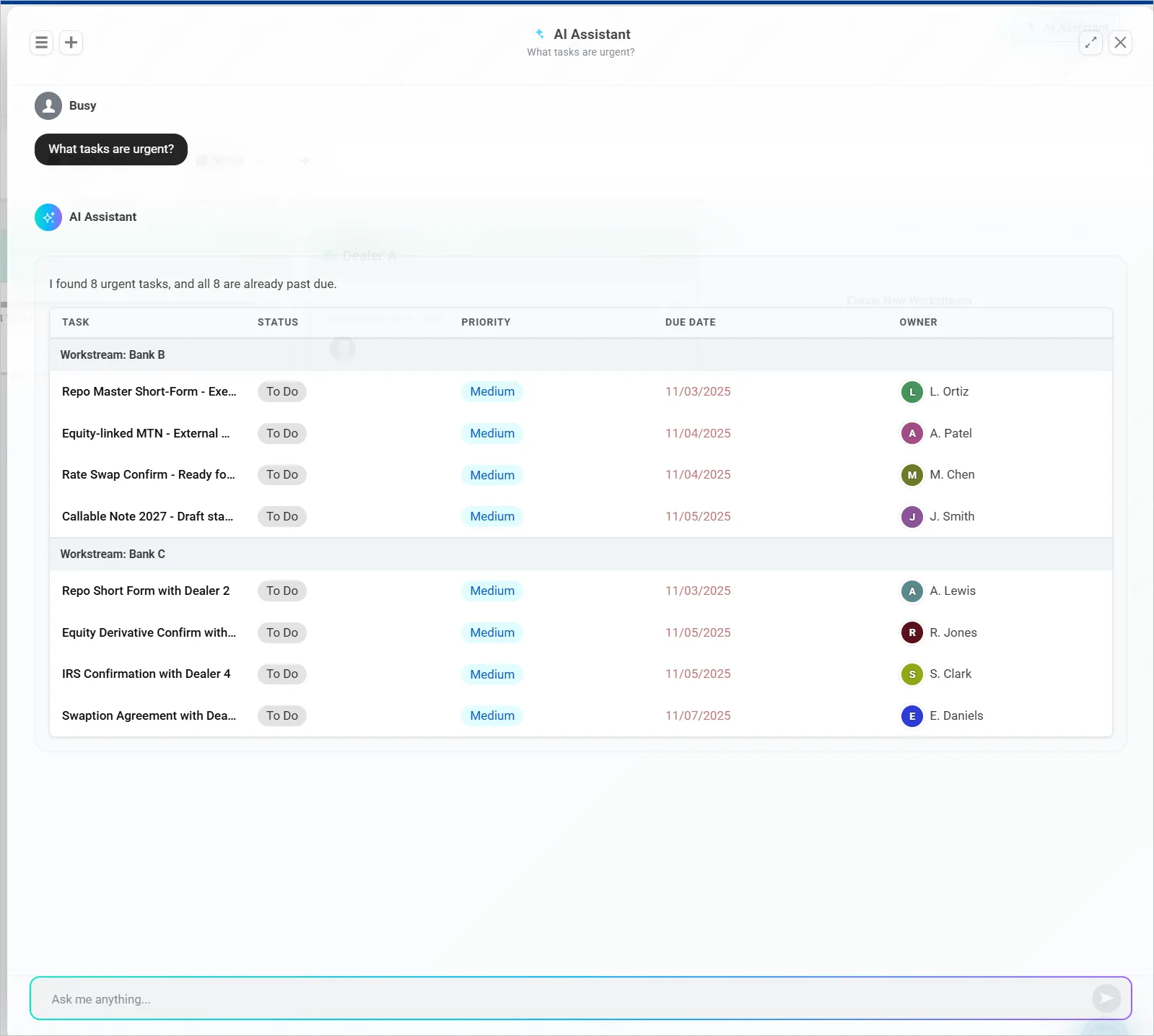
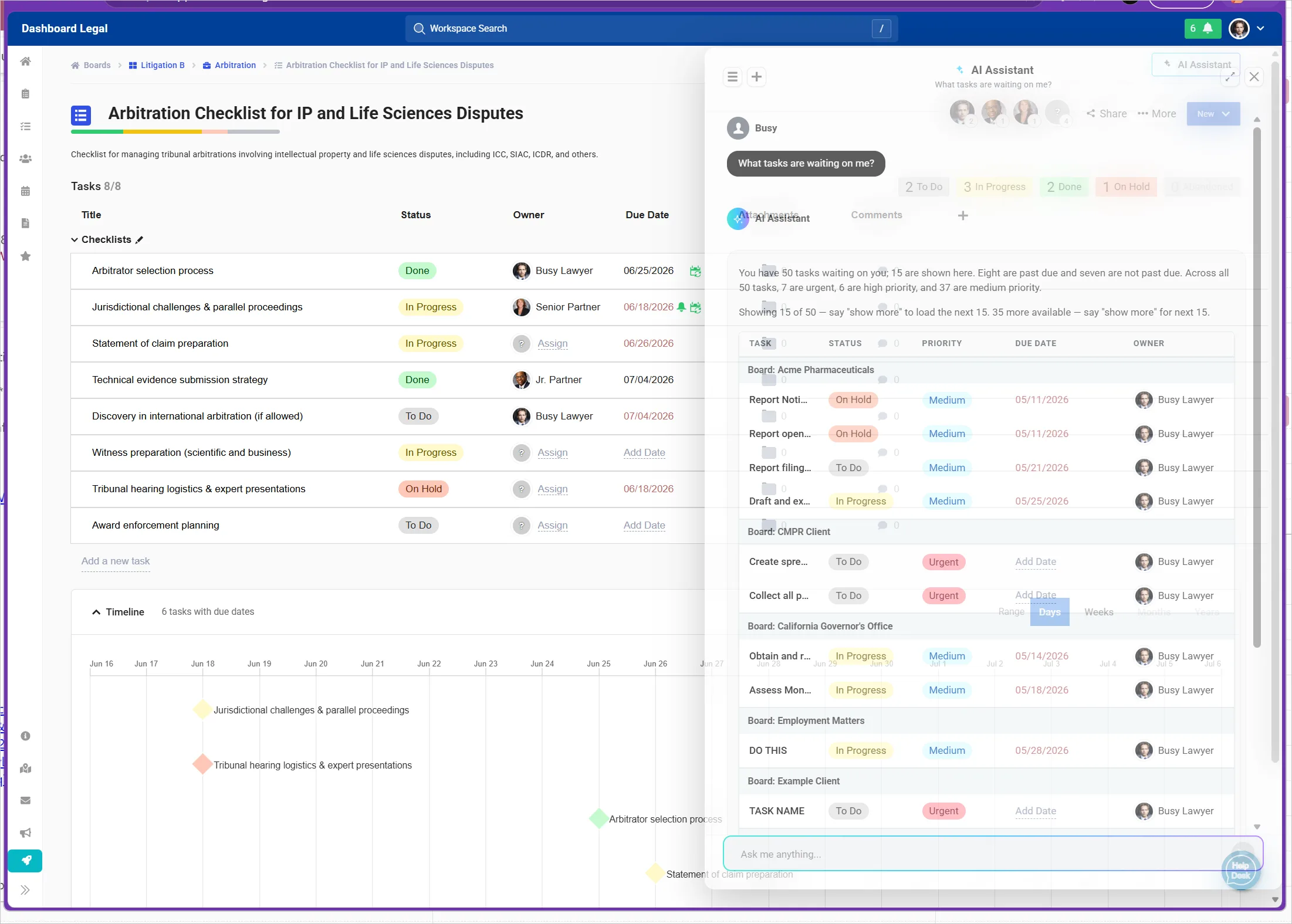
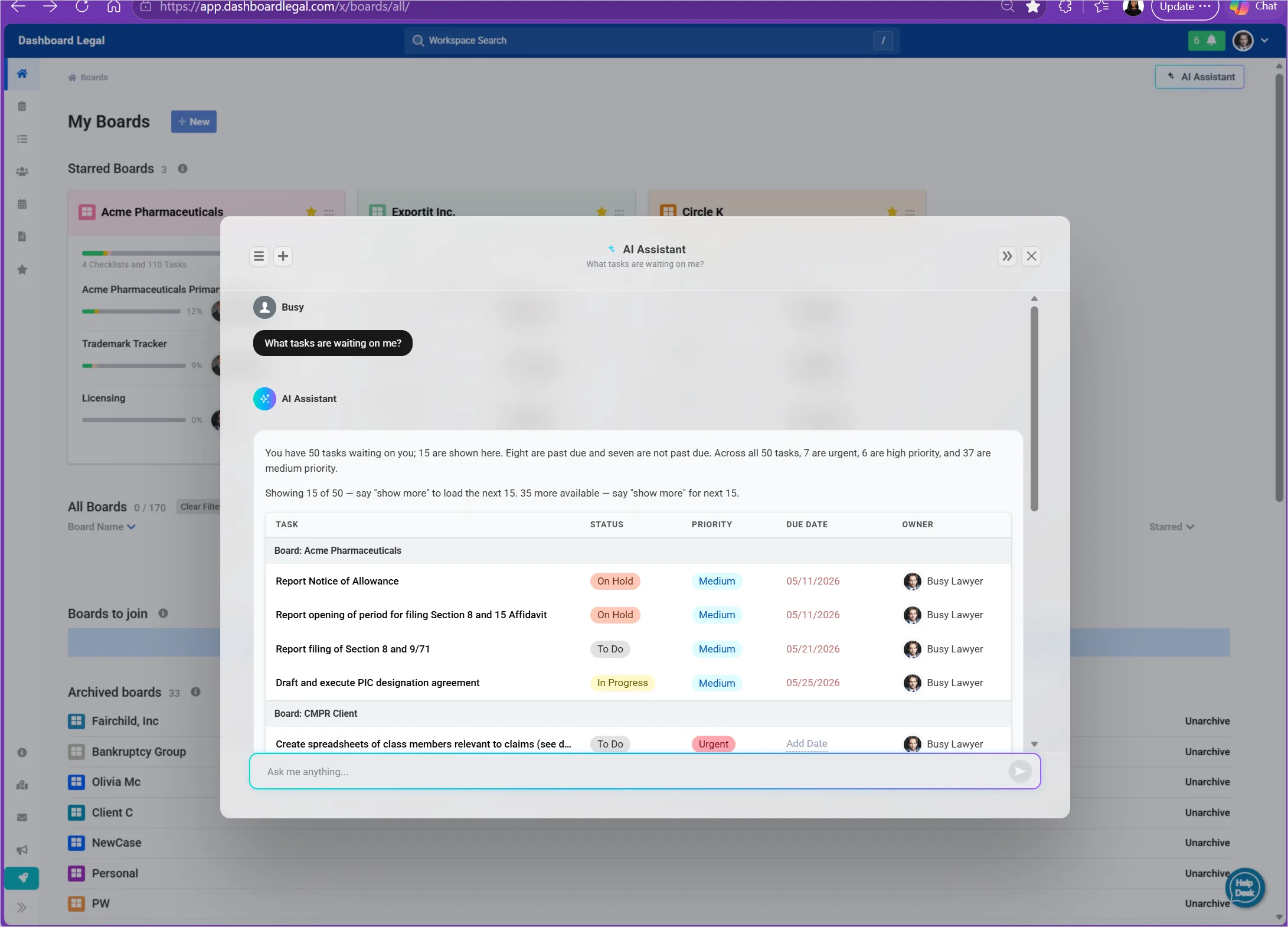
Dash brings AI-powered assistance directly into Dashboard Legal, giving you a faster way to understand what’s happening across your matters and get to the information you need. Ask questions in natural language and receive answers grounded in your matter content—without digging through documents, notes, chats, and other matter resources to find them yourself.
With Dash, you can:
- Ask questions about your matters in plain language.
- Find key information across matter content quickly.
- Summarize and understand important details.
- Surface information that may otherwise be difficult to find.
- Get answers in the context of the matter you’re already working in.
Dash helps turn the information already captured in Dashboard Legal into actionable answers—so you can spend less time searching and more time moving work forward. Click here for more information on Dash.
Recent product updates
June 2026
Groups
Stop adding the same people over and over.
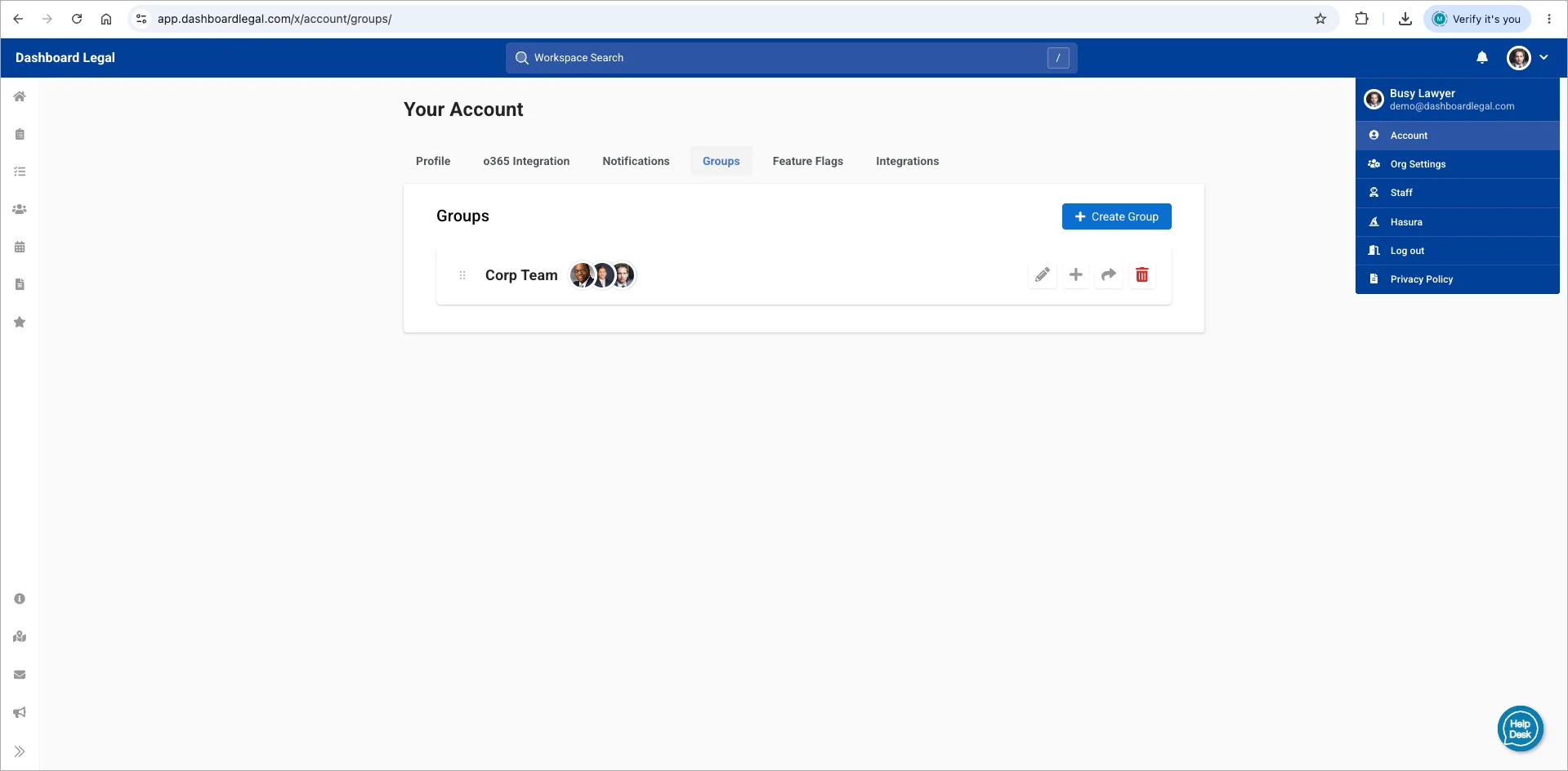
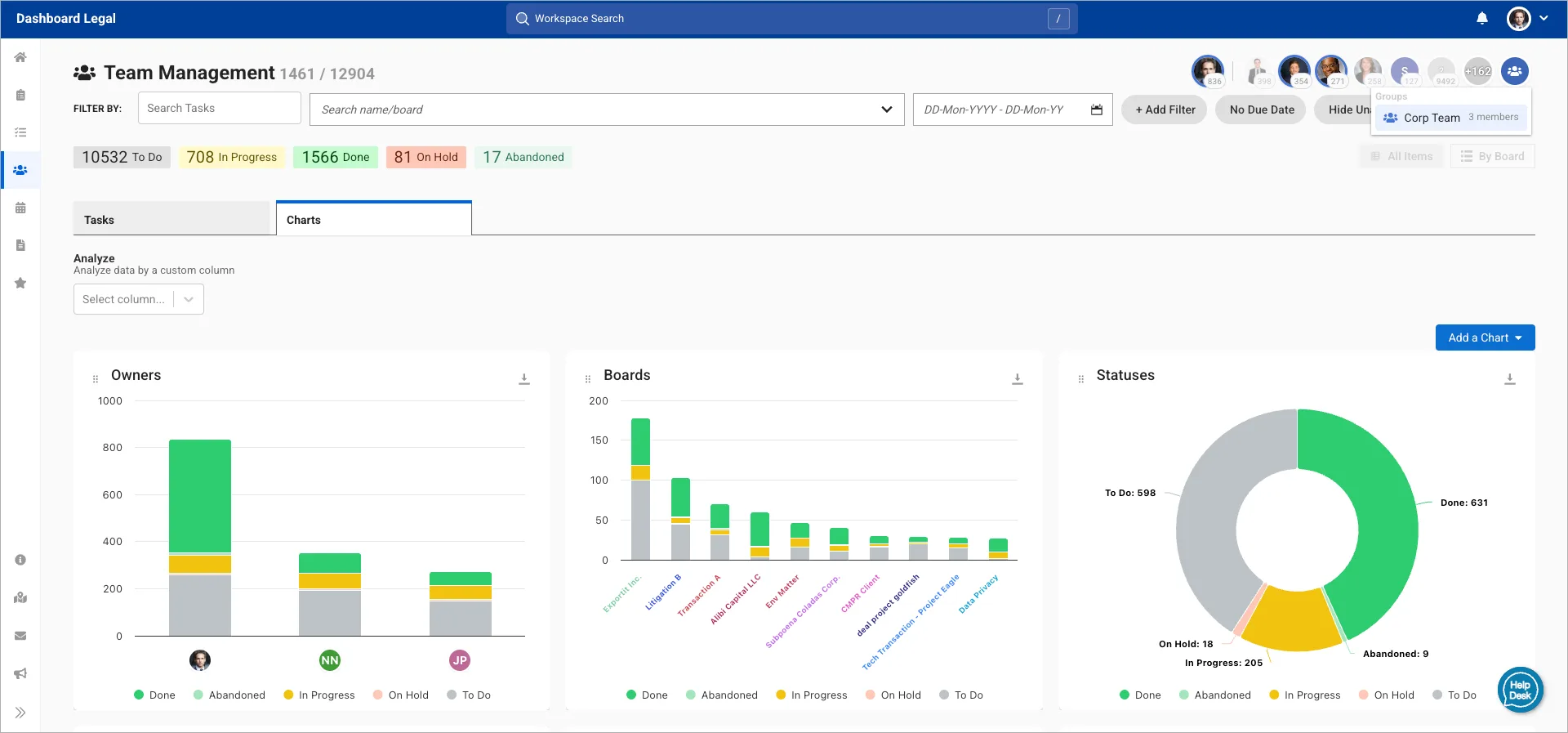
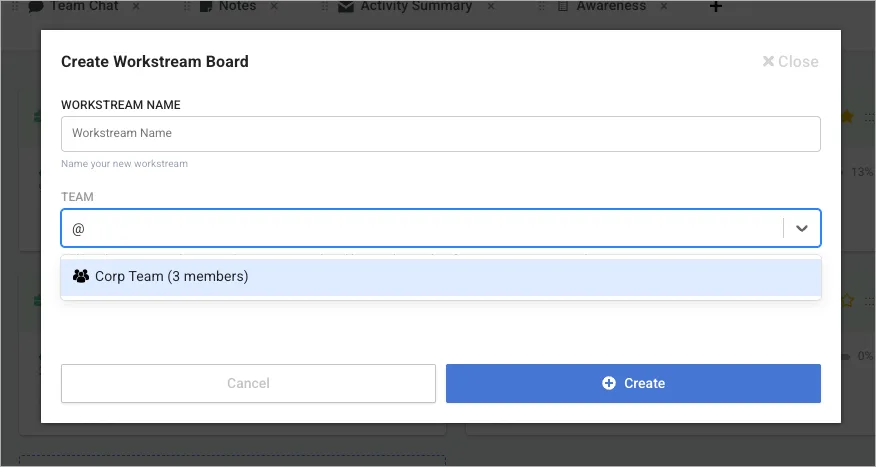
Groups let you save reusable teams of colleagues or external contacts so you can assign work, share resources, and collaborate faster across Dashboard Legal.
Create Internal Groups from your organization’s directory (such as Litigation Team, Employment Practice, or NYC Office), or create External Groups using email addresses for clients, co-counsel, vendors, and other outside contacts.
With Groups, you can:
- Add an entire team to boards, workstreams, and resources in one step.
- Mention @GroupName in chat to notify everyone at once.
- Filter Team views, lists, and charts by group.
- Share groups with colleagues using viewer or editor permissions.
Groups are organization-wide, making it easier to standardize collaboration and keep everyone working from the same team structure.
Awareness
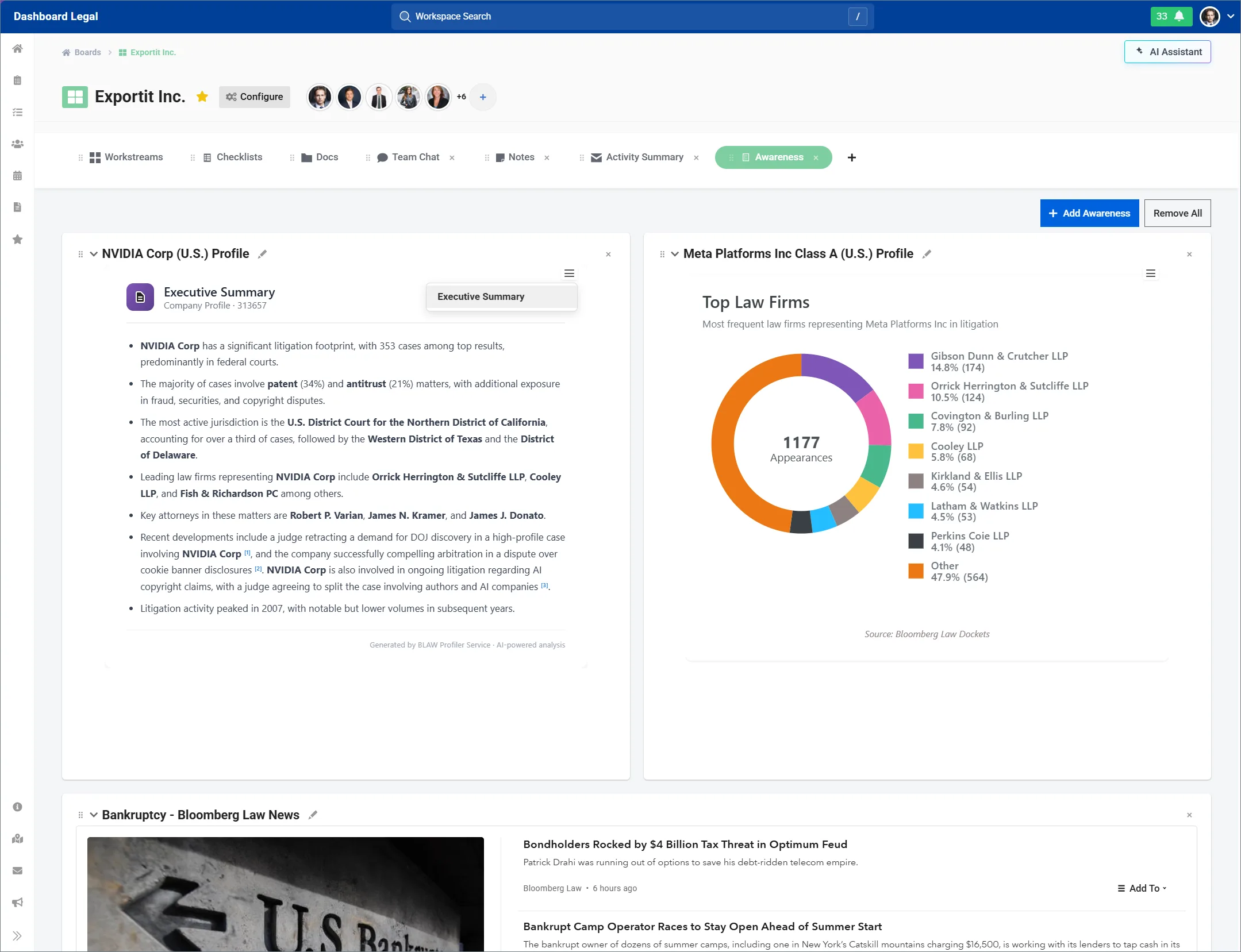
Dashboard Legal now includes integrated Bloomberg Law intelligence, bringing News, Legal Profiler, and Bloomberg Terminal company intelligence directly into your workspace.
Monitor legal, business, and market developments without leaving the matters and workstreams your team manages every day.
- Access trusted Bloomberg Law News directly in Dashboard Legal
- Research companies, law firms, attorneys, and litigation with Legal Profiler
- Gain additional business and market context through Bloomberg Law intelligence
- Keep intelligence connected to tasks, deadlines, and decisions
- Reduce context switching and improve coordination across teams
Stay informed and keep work moving forward—all from Dashboard Legal.
Recent product updates
May 2026
New Workspace Navigation
More tools. Less clutter.
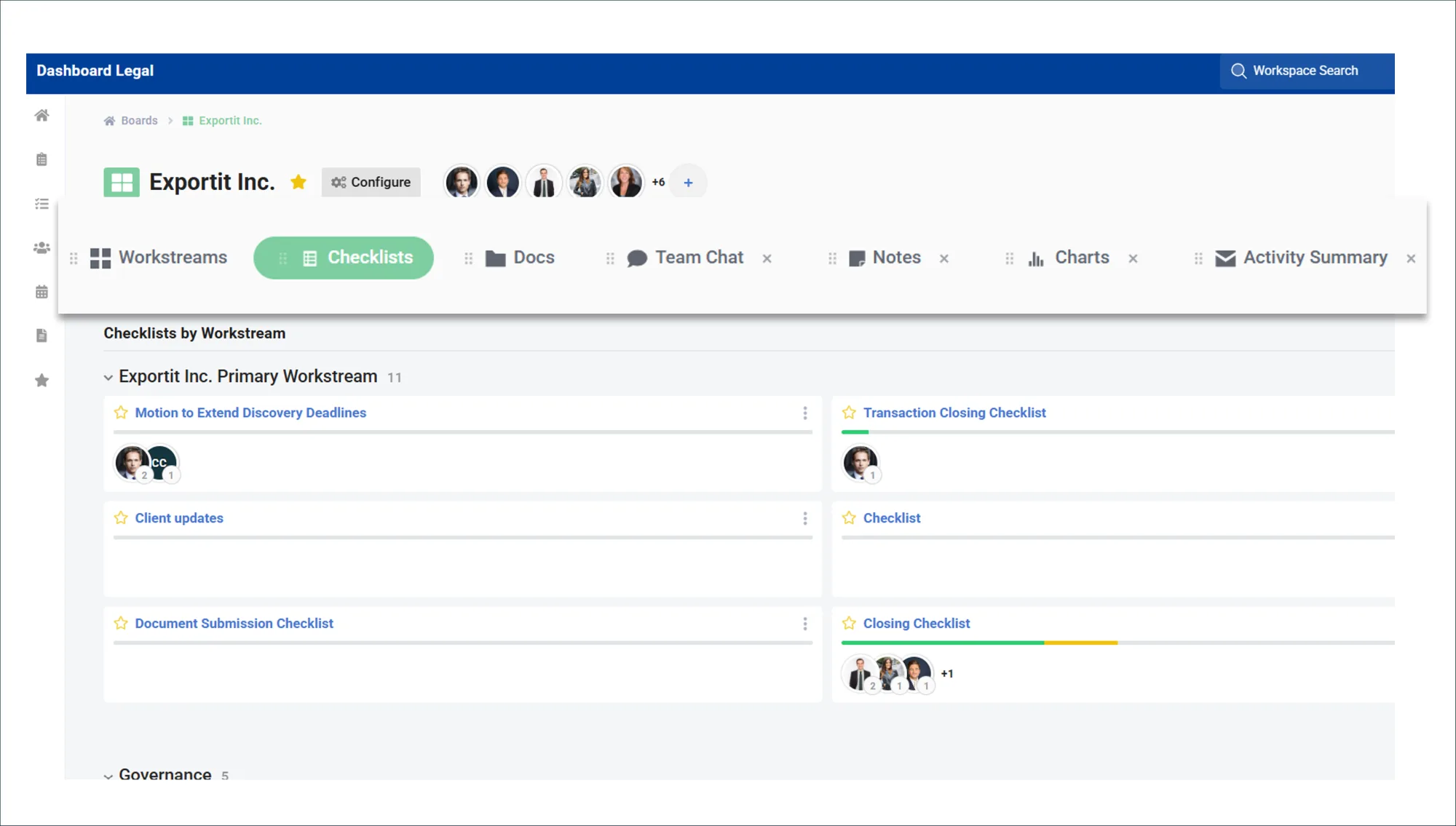
- New layout: Boards and workstreams now have a cleaner tabbed layout, making it easier to move between the tools you use to manage your matters.
- Tabbed organization: Tabs are available at both the board level and within individual workstreams, so you can organize the overall matter workspace and the specific work happening inside each workstream.
- Jump navigation: Instead of scrolling through one long page, you can now jump between docs, checklists, chat, notes, charts, activity summaries, awareness widgets, and more.
Your existing content is still there. It just has a clearer home, so you can find the right context faster and keep complex matters easier to manage.
Analytics & Templates
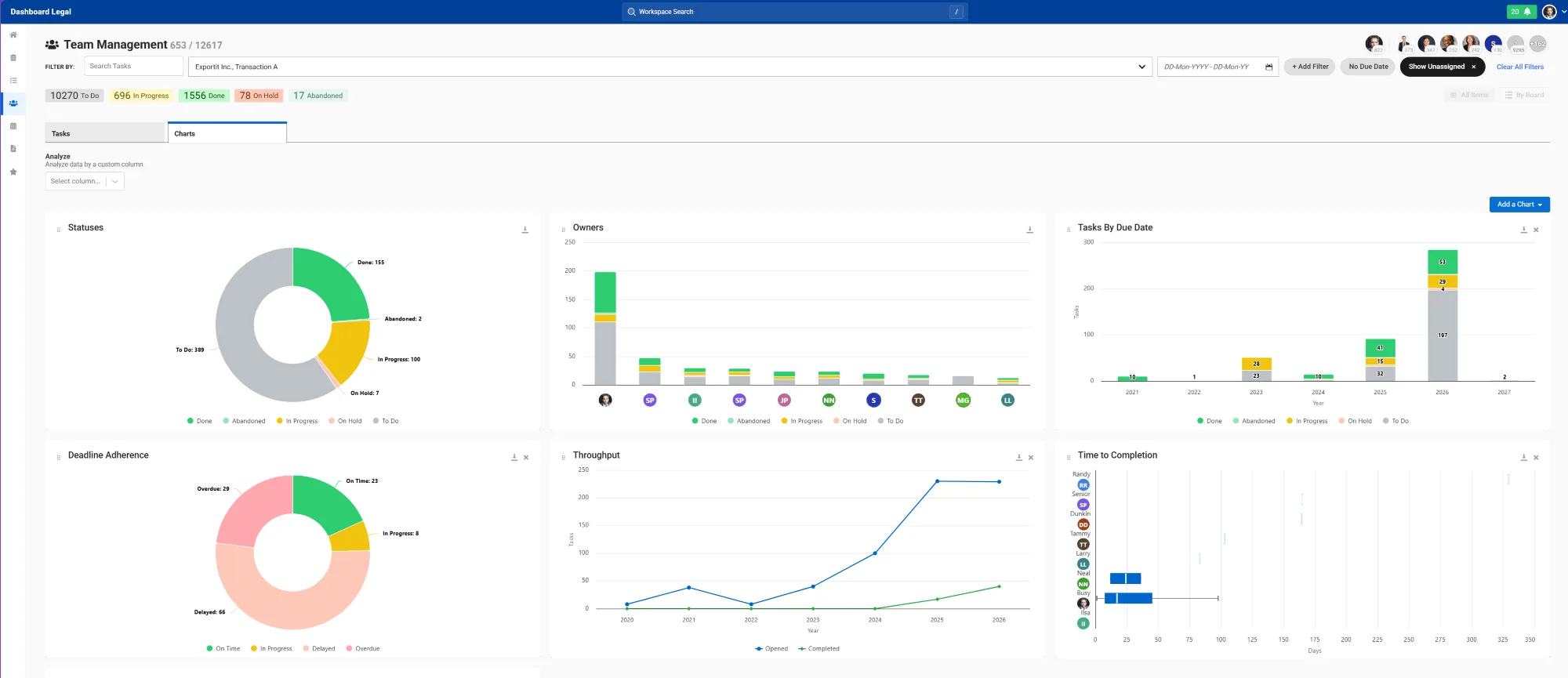
Gain deeper visibility into work across your matters, teams, and workflows with expanded analytics and enhanced template management in Dashboard Legal.
- Expanded analytics: View insights across Boards, Workstreams, and Team View to better understand workload distribution, activity trends, and team activity.
- Flexible reporting: Add, resize, reorder, and download charts to customize how your team views and tracks work.
- Advanced filtering: Filter analytics using templated custom fields to focus on specific clients, matters, teams, or workflows.
- Deeper insight: Analyze work across dimensions like specialist, requesting department, deal stage, or client type to uncover trends and identify bottlenecks faster.
Team View Enhancements
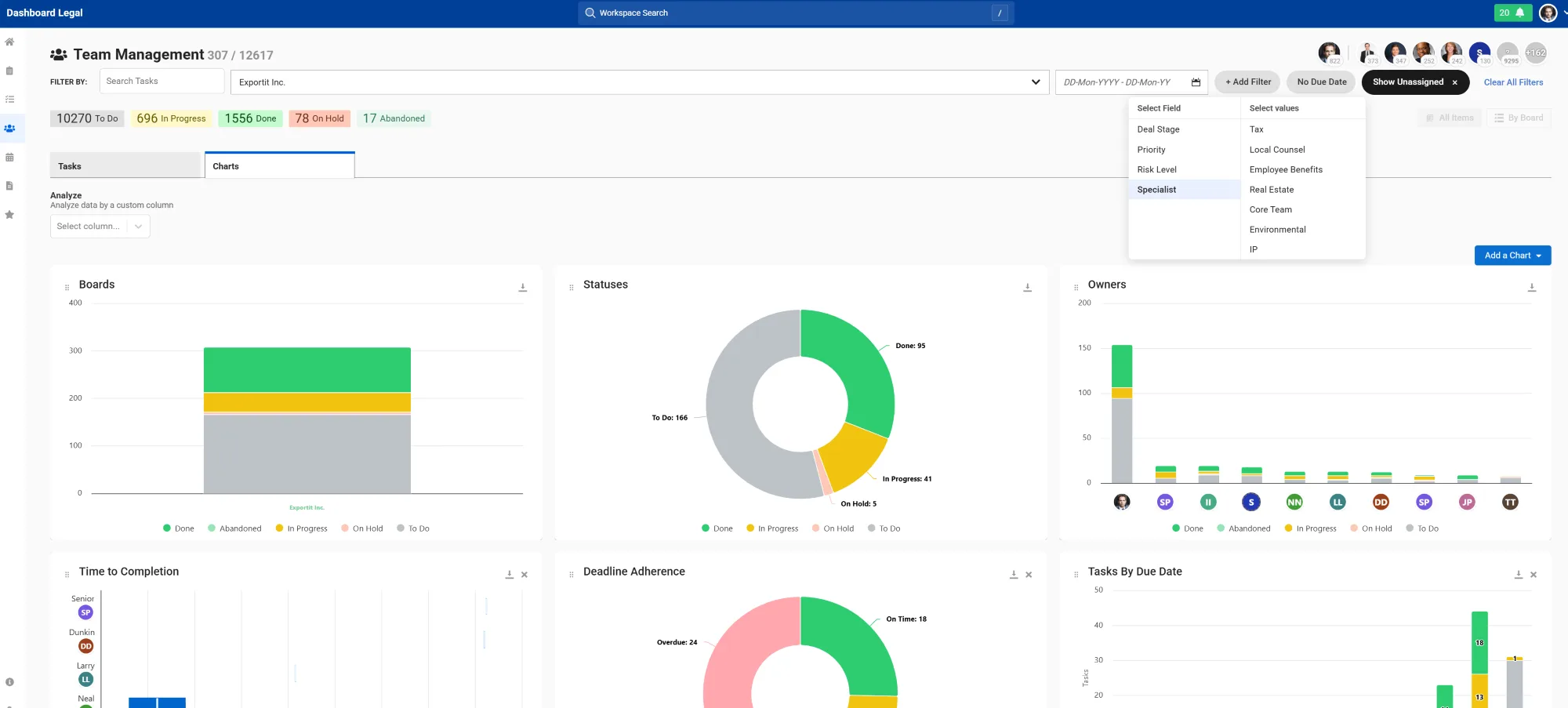
I. Filters: Focus Your DatasetFilters now apply across both Tasks and Charts, helping teams quickly focus on the work that matters most. Filter by standard fields or templated custom columns, such as:
- Specialist
- Requesting Department
- Deal Stage
- Client Type
Select one or more values within a field to narrow your view and isolate specific matters, teams, or workflows for deeper operational visibility.
II. Analyze: Break Work Down
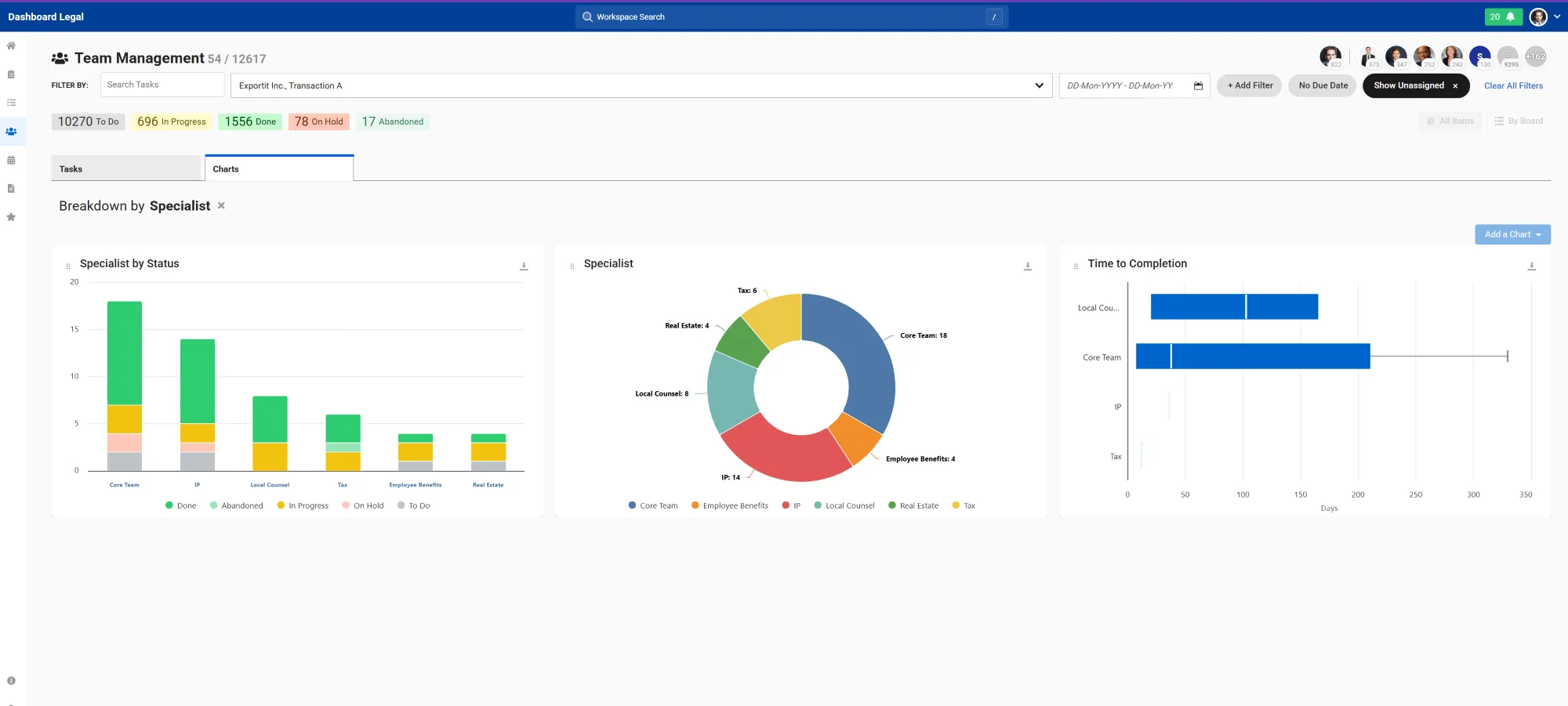
Once you’ve filtered your dataset, use Analyze to break it down across your custom fields for more detailed insight into how work is distributed.
For example:
- Filter to active work on a specific Board
- Analyze by Specialist or Client Type
This helps teams better understand:
- Where work is coming from
- How work is distributed
- Where bottlenecks may be forming
Template Center
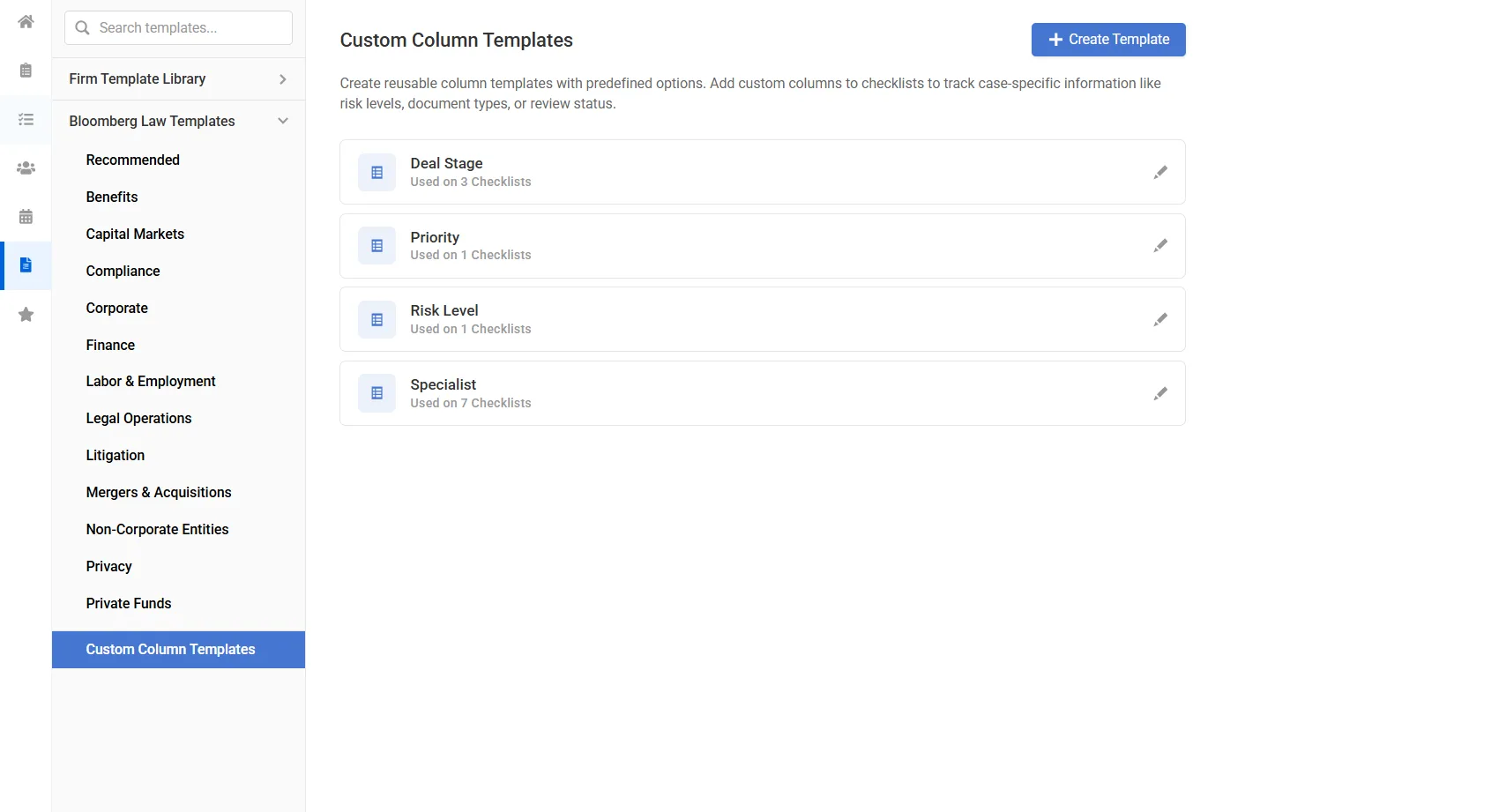
The Template Center now lives in the left sidebar, making it easier to create and manage the structures that power your analytics experience.
- Templated custom columns: Create templated custom columns and apply them across checklists.
- Connected analytics: Once added to tasks, those fields become available in Filters and Analyze within Team View.
- More structured visibility: Define the dimensions that matter most to your practice and use them to better understand and organize work across matters.
AI Auto-Fill (Outlook Add-In)
Turn emails into structured, trackable work in seconds with AI Auto-Fill for the Dashboard Legal Outlook Add-In.
- Instant task creation: Convert emails into fully populated tasks without manual copying or data entry.
- AI-powered extraction: Automatically capture key details like status, priority, due dates, owners, descriptions, and custom field data directly from email content.
- Faster workflow execution: Push work directly into checklists and workflows to keep matters moving without switching between tools.
- Improved consistency: Standardize how work is captured and organized across teams while reducing errors and missed details.
April 2026
Activity Summaries
Turn inbox chaos into AI-generated activity summaries—automatically.
- Automatically organized: AI captures, categorizes, and synthesizes emails, documents, and activity into a single, structured timeline.
- One unified view: Every key update, decision, and milestone—instantly pulled together in one place.
- Less inbox noise: No more digging through threads—AI surfaces what matters most.
- Smarter alignment: Teams stay on the same page with shared, real-time summaries.
- Faster decisions: Instantly see what needs attention—without the manual work
Ready to get started? Contact your Dashboard Legal representative to enable Activity Summaries.
March 2026
Watchers
Keep everyone aligned without changing ownership. Add Watchers to any task in Dashboard Legal to keep stakeholders informed, connected, and up to date as work progresses.
- Shared visibility: Ensure teams and stakeholders can follow progress across matters without needing direct ownership
- Centralized updates: Reduce back-and-forth by keeping status updates tied directly to the task
- Cross-team alignment: Collaborate seamlessly while maintaining clear accountability with a single task owner
- No duplication: Stay aligned on shared work without creating redundant tasks or workflows
February 2026
Microsoft SharePoint Integration
Eliminate context switching by unifying your documents and your tasks. Access, manage, and track your SharePoint files directly within Dashboard Legal.
- Seamless connection: Link SharePoint folders directly to specific boards and workstreams.
- In-app management: Preview documents and track version history without leaving the platform.
- Direct uploads: Add files to workstreams and automatically store them in the correct SharePoint folder.
- Granular attachments: Link SharePoint files to individual checklist items for precise organization.
- Global search: Locate any SharePoint document instantly using our workspace-wide search.
Task Date Dependencies
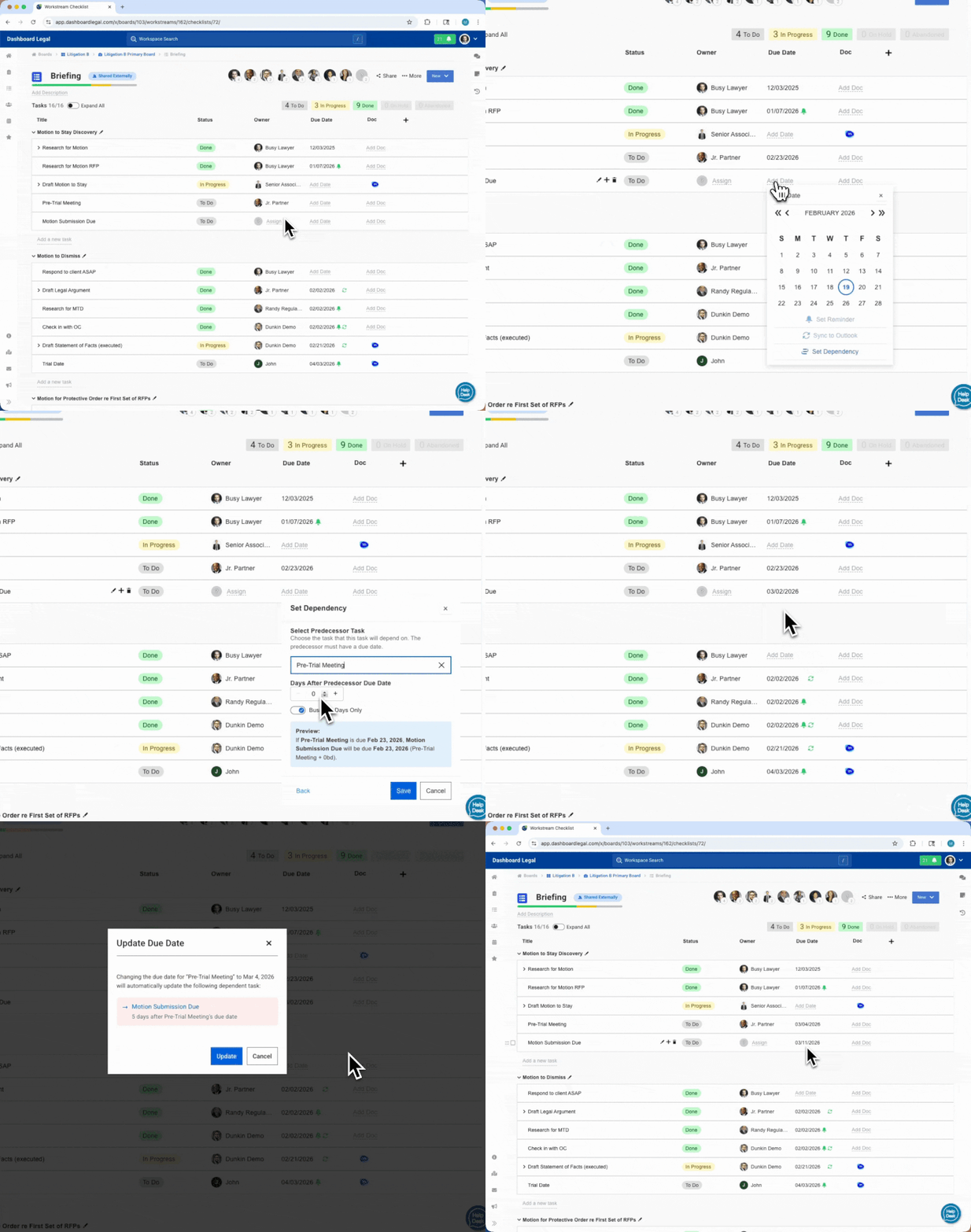
Maintain accurate timelines without manual calculations. When plans evolve, your schedule adapts automatically to ensure your team stays aligned. You can now:
- Set day-based offsets: Define the exact number of days between related tasks.
- Automate updates: Instantly adjust dependent due dates when an anchor task changes.
- Apply smart logic: Choose between calendar days or business days to reflect real-world schedules.
- Preview changes: Visualize how date shifts impact your entire workstream before confirming.
Flexible Board & Workstream Layouts
Tailor your workspace to fit your workflow. Customize Boards and Workstreams with configurable widgets, giving you full control over how information is displayed without altering the underlying structure.
- Focused views: Toggle widgets on or off to reduce clutter and prioritize the information that matters most.
- Independent configurations: Apply unique layouts to individual Boards and Workstreams to suit specific project needs.
- Expanded integration: Incorporate widgets like Interlink, Bloomberg Law News, Charts, Docs, and Checklists directly into your dashboard.
- Safe customization: Adjust your view with confidence – hiding a widget never deletes data and can be reversed instantly.
- Smart foundations: Start with intelligent defaults, ensuring essential tools like Primary Workstreams, Docs, and Checklists are always accessible.
January 2026
Favorites bar
Access your most critical work faster. We’ve redesigned the Favorites experience to give you total control over how you navigate your boards and checklists.
- Drag-and-drop organization: Reorder sidebar favorites instantly to match your priority list.
- Dedicated view: Manage all favorited items on a single, standalone page.
- Flexible sorting: Reorganize your Favorites page without disrupting your sidebar structure.
- Advanced filtering: Sort boards and checklists by custom order, creation date, or last updated status.
November 2025
Resizing columns
Customize Dashboard Legal to work exactly how you need it to. Your personalized column settings will remain in place, ensuring consistency across your workflow management. In triage, standalone, and regular workstream checklists, you can:
- Drag and resize as many columns as you want
- Retain your personal settings on each specific checklist
October 2025
External checklist enhancements
Reduce the back-and-forth and streamline how you deliver legal work. You can now:
- Attach files directly within the checklist
- Compare document versions seamlessly
- Chat with external recipients without leaving the platform
- Allow external parties to edit tasks, empowering collaboration
Triage checklists
Organize, assign, and prioritize incoming legal requests the moment they arrive. Route them instantly into appropriate workstreams to keep everything on track – perfect for capturing and centralizing new requests, so you don’t miss anything.
Standalone checklists
Kickstart projects quickly and reduce decision fatigue. Give your firm a proven playbook to move fast, stay consistent, and collaborate seamlessly for better results.
New custom column types
Add more flexibility to your checklists with new custom column options that help you collect, organize, and display exactly what your team needs:
- Multiple choice dropdown fields
- Data fields for structured information
- Auto-select fields for streamlined data entry
AI Uploader enhancements
Convert files into checklists effortlessly to streamline project management and boost efficiency. Upload Excel, Word, and PDF documents with ease. Our enhanced AI tool now recognizes more column types and data formats, making your workflow automation even more powerful.
They love it. You will too.
“What works for me on a matter may not work for one of my partners handling a commercial litigation dispute. We needed a platform that allows bespoke flexibility across our matter base, and Dashboard Legal does that.”
Jimmy F. Maruna
Partner
Cassiday Schade
“We turned to Dashboard Legal for a legal-specific project management tool to help our attorneys get better organized, collaborate on matters, and get real-time visibility into who is doing what and where things stand.”
Naveen Pai
Chief Knowledge Officer
Gunderson Dettmer
“It’s enabled our team to be more effective and organized and helps us manage our matters in ways that were simply not possible before using Dashboard Legal.”
Anthony Millin
Shareholder
Founder & Co-Chair of NEXT
Shulman Rodgers